
Complete guide to invoice functionality in the Stax API, including lifecycle management, structure, status transitions, and implementation best practices.
An invoice is a document that provides details about a transaction, including the merchant, customer, and monetary exchange. The customer-facing version of an invoice is often called a bill. This page provides an in-depth understanding of invoice functionality within the Stax API, including its lifecycle, structure, and common use cases.
Statuses
Invoice statuses in the Stax platform are automatically managed by the system and cannot be manually modified via API requests. Actions such as creating, sending, viewing, and making payments impact the current status of an invoice. However, certain functionalities, such as reverting statuses after refunds, require careful implementation to ensure accurate status tracking.
Status Transitions Overview
DRAFT → SENT: After sending the invoice via email.
DRAFT → VIEWED: If a customer views an invoice sent via a different email method.
DRAFT → PAID / PARTIALLY PAID / ATTEMPTED: When payments are processed directly.
Any status → DELETED: When the invoice is deleted.
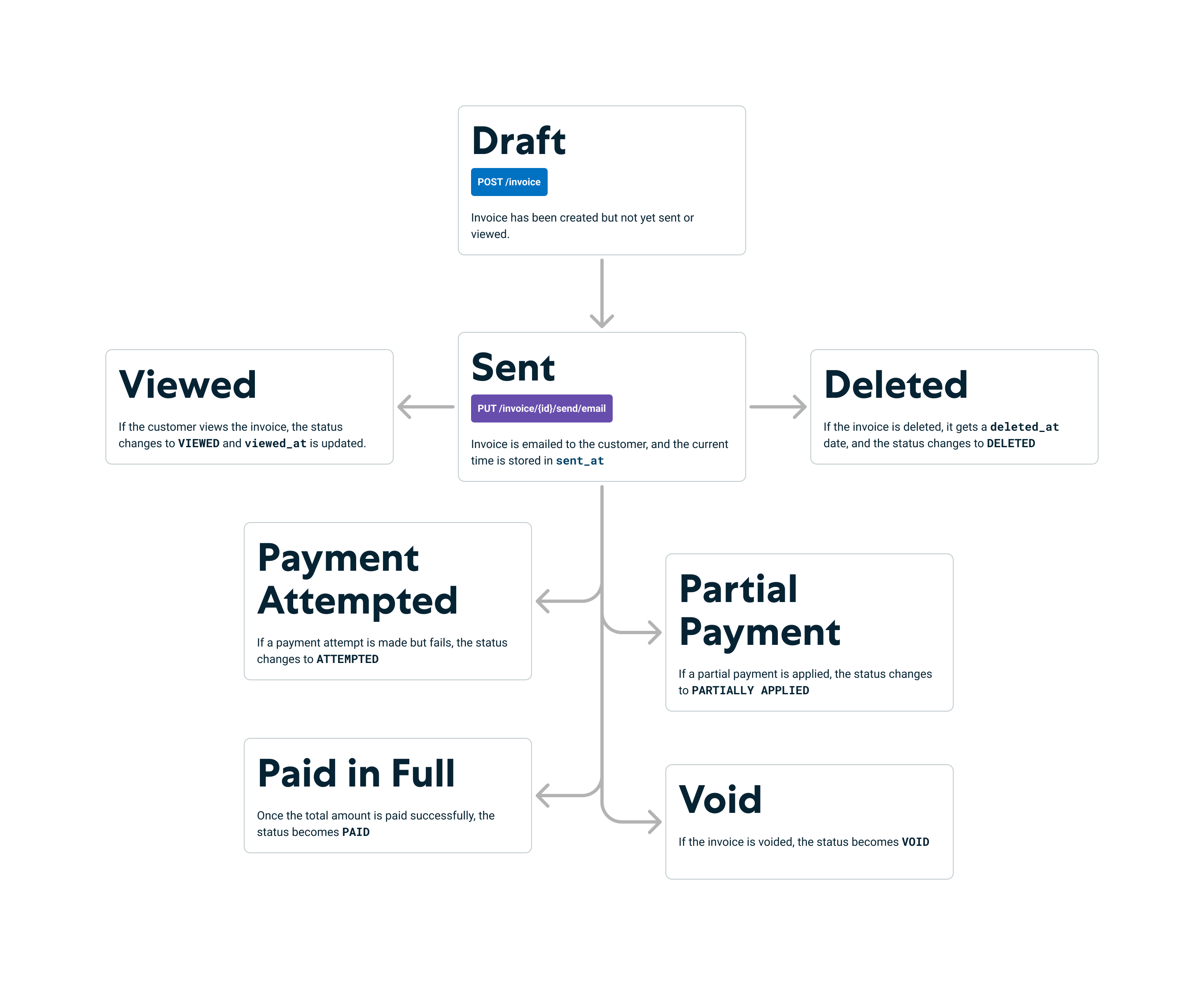
Invoice Operations Diagram
| Status | Description |
|---|---|
DRAFT | The invoice has been created but has not yet been sent or viewed by the customer. It is in a preliminary state. |
SENT | The invoice has been sent via email, and the sent_at timestamp is recorded. |
VIEWED | The customer has viewed the invoice, with the viewed_at timestamp indicating when this occurred. |
PAID | One or more payments have been successfully applied to the invoice, covering the total amount. |
PARTIALLY APPLIED | A payment was made for less than the total invoice amount, and it was successful. |
ATTEMPTED | A payment attempt was made for the invoice but failed. |
DELETED | The invoice has a deleted_at date, indicating that it has been deleted. |
Note: Status transitions such as refunds or voids are automatically managed. Ensure your integration accounts for these updates when handling payments or deletions.
Invoice Structure
Understanding the structure of an invoice is critical for developers to handle API responses effectively. Below are the key fields in an invoice:
| Field | Description |
|---|---|
id | Unique identifier for the invoice. |
customer_id | Links the invoice to a specific customer. |
items | List of items or services billed in the invoice. |
total | Total amount due for the invoice. |
taxes | Any applicable taxes are included in the invoice. |
memo | Optional note for the customer, often used to provide additional context. |
sent_at | Timestamp when the invoice was sent via email or SMS. |
viewed_at | Timestamp when the invoice was viewed by the customer. |
paid_at | Timestamp when the invoice was fully paid. |
deleted_at | Timestamp when the invoice was soft-deleted. |
For detailed information on customer management and linking customers to invoices, refer to the Customer Management documentation.
Common Use Cases
Creating an Invoice
When you create an invoice using the POST /invoice endpoint, the invoice is initially assigned a status of DRAFT. This means the invoice has not yet been sent or viewed.
Sending an Invoice via Email
If the invoice belongs to a customer with an email, you can send it using the PUT /invoice/{id}/send/email endpoint. This action will:
- Update the invoice status to
SENT. - Record the current timestamp in the
sent_atfield.
Invoice Viewed by Customer
The VIEWED status is assigned when a customer opens the invoice email or views the invoice through the link provided. This status will have a viewed_at timestamp to indicate when the invoice was viewed.
Note: The SENT and VIEWED statuses are only applicable if the merchant uses the Stax email solution or UI to send invoices. If an API integrator manages the email process themselves, the invoice may go directly from DRAFT to VIEWED or even directly to PAID.
Handling Refunds and Voids
- Refunds: If a payment linked to an invoice is refunded (fully or partially), the invoice's status will be updated to reflect the new payment total.
- Voids: Voiding a payment linked to an invoice reverts the status and makes the invoice eligible for a new payment attempt.
Deleted Status
The DELETED status can branch from any other status. This indicates the invoice has been soft-deleted, meaning it is inaccessible but still exists in the database for reference or restoration.
Invoice Implementation Best Practices
Unique Identifiers: Use a UUID or unique identifier for each invoice to avoid conflicts during creation and updates.
Tracking Payments: Link transactions to invoices via the invoice_id field for complete payment tracking. For advanced payment tracking strategies, see the Transaction Management guide.
Error Handling: Implement robust error handling for scenarios like invalid customer details, failed payments, or incorrect invoice IDs.
Customization: Leverage hosted invoice pages to enable tipping, partial payments, memo display, or hiding line items for customers. Use the meta.hideCustomerLineItems field to control line item visibility on the customer-facing bill page.
Status Monitoring: Set up webhooks to monitor invoice status changes in real-time. See the Webhooks Guide for implementation details.
Troubleshooting
| Issue | Possible Cause | Solution |
|---|---|---|
Invoice not transitioning from DRAFT to SENT | The email sending process failed, or the email is invalid. | Verify email format and API request parameters. |
404 Not Found when retrieving an invoice. | The invoice ID is invalid, or the invoice has been deleted. | Double-check the invoice ID and status. |
| Payments not applied to the invoice. | Payment is not linked to the invoice. | Ensure the payment is associated with the correct invoice_id. |
Related Resources and Next Steps
After mastering invoice management, explore these related topics to enhance your integration:
Learn how to process payments for invoices and handle different payment methods
Manage customer data and relationships with invoices
Generate reports on invoice performance and payment trends
Set up real-time notifications for invoice status changes