
Developing Tap to Pay
Currently Tap to Pay is in Beta Release. If you would like to participate, please reach out to your Account Manager.
Pre-requisites
iOS Minimum Version
In order to support all required Card Schemes, the minimum supported iOS version for Stax iOS SDK 2.5+ has been updated to 17.4.
To ensure compatibility and avoid Swift compile-time errors, please use Xcode version 16.4.x or higher when developing your integration.
Apple Sandbox Account
To develop an application utilizing Apple's Tap to Pay technology, the device must be signed into a developer sandbox account.
These can easily be created from App Store Connect under “Users And Access > Sandbox”.
Entitlements
Apple Tap to Pay requires additional entitlements, which must be requested by the Apple Developer Account Holder. These entitlements are divided into two types:
- Developer Entitlements: Enables application development on devices registered under the Apple Developer account.
- Publishing Entitlements: Used when the application is ready for release on the Apple App Store.
The form for requesting entitlements can be found here.
To access the request form, you must have an organization-level Apple Developer account
and be logged in as the Account Holder. Additionally, you will need to verify that NMI is your approved Payment Service Provider (PSP) and confirm the regions where you plan to deploy your application.
In order to receive Publishing Entitlements from Apple your app must comply with Apple’s
user experience requirements for Tap To Pay applications which can be found in Appendix B Apple User Experience Requirements.
When you’re ready to apply for Publishing Entitlements simply reply to the email which
supplied the development entitlements and quote the Case ID assigned when submitting your request for entitlements. Apple will be in touch with information on how to submit your application for review.
For full details please refer to Apple User Experience Requirements.
Restrictions
Tap To Mobile is an always-on feature and cannot function without an internet connection at the point of interaction.
Offline transactions are not supported as they are restricted by the payment industry's security standards for Tap To Mobile transactions.
GEOFENCING RESTRICTIONS
Tap to Mobile uses geofencing as a fraud-prevention measure. The API key associated with the Stax-provided testing merchant is US-only, so Tap to Pay testing must be completed on a US-based device.
Additionally, transaction processing is currently restricted to the United States.
Project Setup
The development entitlement allows you to build and test your Tap to Pay on iPhone implementation. Once you’ve received your developer entitlements, you’ll need to add the following capabilities to your application’s Identifier:
- App Attest
- NFC Tag Reading
- Tap To Pay on iPhone
Tap To Pay on iPhone will appear once your development entitlements have been approved
by Apple, at which point it’ll appear under “Additional Capabilities” when configuring your application’s Identifier.
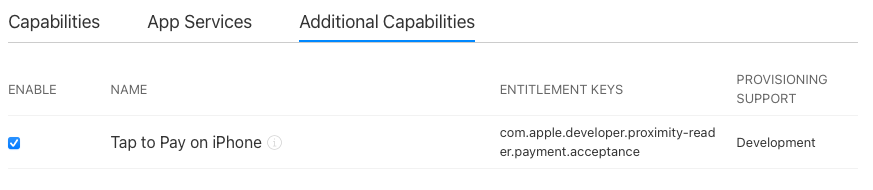
Once the application’s Identifier is configured, you must create a new provisioning profile linked to it and add it to your XCode project.
Within your application’s Xcode project, you will then need to update your entitlements file with the following:
| Key | Type | Value |
|---|---|---|
| App Attest Environment | String | development |
| com.apple.developer.proximity-reader.payment.acceptance | Boolean | YES |
| Near Field Communication Tag Reader Session Formats | Array | 1 Item |
| Item 0 (Near Field Communication Tag Reader Session Formats) | String | Tag-Specific Data Protocol (TAG) |
If your project doesn’t contain an entitlements file, you can create one in Xcode:
- Choose File > New > File, select Property List from the Resource section, and click
Next. - Enter your_project.entitlements as the filename. Replace y_ourproject
with the name of your project, then click Create. - In the project editor, choose Build Settings.
- Click All and Combined in the scope bar.
- Use the search box to find the Code Signing Entitlements setting.
- Enter the full path to the .entitlements file from step 3 as the setting’s value.
As part of your development time, you should factor in adhering to Apple’s User Experience
requirements. You’ll need to prove you’re following these to receive your Publishing Entitlements.
In addition to the Stax iOS SDKs usual dependencies, you will also need to link against the following to work:
- CloudCommerce.xcframework
- idtech
When adding the CloudCommerce.xcframework do so from your application target under
The general section in “Frameworks, Libraries, and Embedded Content” ensures that the Embed drop-down is set to “Embed and Sign.”
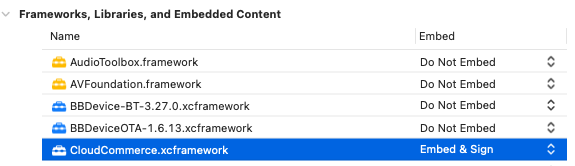
Please look at the Stax iOS SDK - API for Release Documentation supplied
within the release bundle for a more detailed breakdown of required dependencies for running the Stax iOS SDK.
During configuration, the Stax iOS SDK will perform a suite of security checks, including requiring the integrating application to be granted location permissions. The recommended permission level is CLAuthorizationStatus.authorizedWhenInUse.
PRODUCT_TEAM_IDENTIFIER
To properly attest to the security of the application when using Tap To Mobile, the team identifier must be added to the application info.plist.
Permission usage descriptions
When requesting location permissions, iOS will look for the following within the application's info.plist:
- Privacy - NFC Scan Usage Description
- Privacy - Location When In Use Usage Description
- Privacy - Location Always and When In Use Usage Description
Example
| Key | Type | Value |
|---|---|---|
| PRODUCT_TEAM_IDENTIFIER | String | <your team identifier> |
| Privacy - NFC Scan Usage Description | String | This application needs to read NFC cards and tags to accept payments. |
| Privacy - Location When In Use Usage Description | String | This application must verify that you are operating the app from a permitted location. |
| Privacy - Location Always and When In Use Usage Description | String | We want to access your location to store it with each transaction. |
Updated about 1 month ago