
Fee Statement
The fee statements report provides a detailed summary of deposits, sales and fees to provide insight into your business.
Summary
The Summary section provides highlights, including total sales and fees. Use the date picker to select a time frame to view. Note that data for the previous month is updated and available on the 8th of the month.
Note: Fee statements use UTC. This may impact the dates when transactions appear.
What is a batch?
Transactions are settled as a group known as a batch. A batch is a group of transactions that occur in a period of time, typically a day.
Batch cut off times can vary depending on the funding type. Typically the cut off time is 12am UTC / 8pm EST.An example of a batch: May 31, 8pm EST to June 1, 8pm EST transactions would be in the June 1st batch.
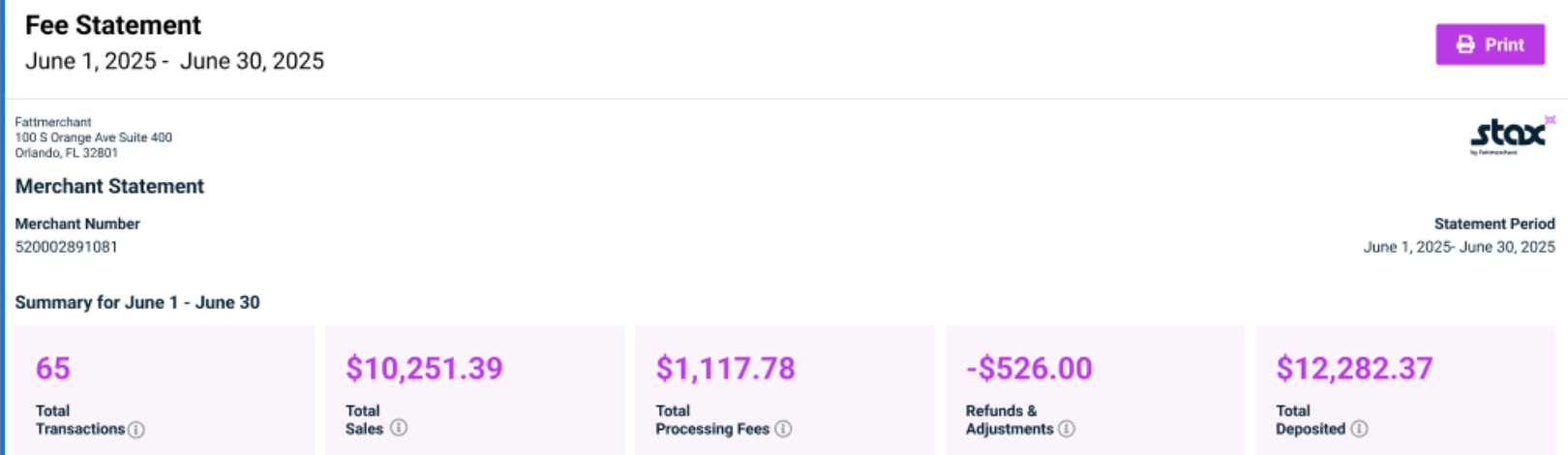
Total transactions, sales, processing fees, and refunds are all based on the batches in the statement period.
Total deposits refer to the amounts funded during the statement period. Let the merchant know how much they were funded in the statement period/month.
Deposit
The deposit section displays the net deposits for the month. Clicking on the deposit date ID opens the Deposit report details.
The deposit section is not associated with the batches; it’s based on the amount funded during the statement period.
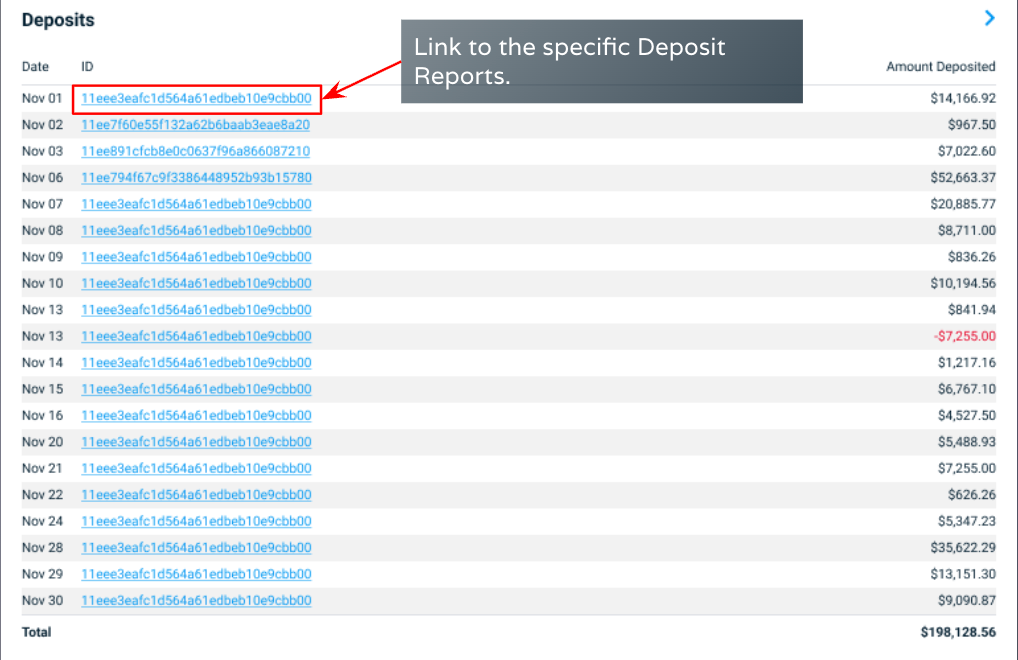
| Field | Description |
|---|---|
| Date | The date when the deposit occurred. |
| ID | Stax generated transaction ID. |
| Amount Deposited | The net deposited amount. Depending on your account settings, this could be multiple transactions. Click the deposit transaction to review specifics about the deposit. |
Clicking on a deposit will open a deposit detail page.
Fee overview
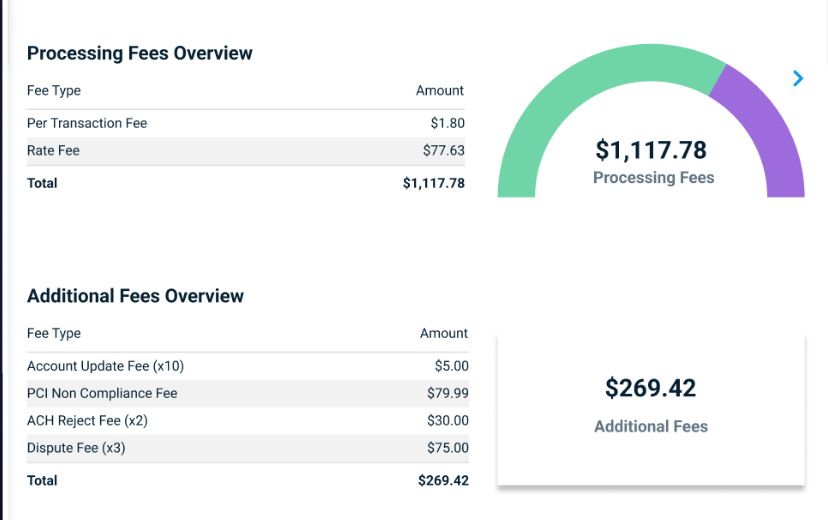
The fee overview provides a breakdown of the fees paid in the month. The overview may appear differently depending on transactions, rates, and accounts.
The processing fee is related to the amount processed. It can be used to calculate the effective rate.
Fees
| Fee | Description |
|---|---|
| Minimum Merchant Bill | A fee that is applied if the merchant account has no transactions (charges or sales) within a 30-day cycle, from the start to the end of the month. |
| Rate | The rate fee is charged based on the rate configured to the merchant account. This can be a percentage or a flat rate. |
| Per Transaction | The per-transaction fee is charged every time a payment is processed. It is sometimes referred to as the per-swipe fee. |
| PCI Annual | A fee is applied if the merchant maintains their PCI compliance throughout the year. |
| On File | A fee applied to merchant accounts classified as Active or Inactive (but not including those covered by the Minimum Bill Fee). |
| Annual | A fee that is applied to all merchant accounts classified as Active or Inactive (but not including those covered by the Minimum Bill Fee). |
| Account Updater | The Updater fee is assessed when Stax automatically updates a card. A card may fail due to expiration, and Stax can automatically update the card with the new expiration date to ensure a payment succeeds. The Account Updater will have a monthly fee, as well as any additional fees for activities related to updating a card. |
| Interchange | Interchange fees are charged to processors and businesses by issuing banks and card brands for the services they provide. They are the wholesale cost of accepting credit cards. |
| PCI Non-Compliance | Merchants have 60 days from the date their new Stax merchant account is approved to become PCI compliant. After 60 days, merchants who fail to meet their data security standards (DSS) are subject to a non-compliance fee from the major card companies. See |
| Surcharge Platform | A fee charged to every active merchant who utilizes the Surcharge functionality. |
Clicking on the ID will direct you to the payments section, where you can view the transaction description.
Additional feesAdditional fees refer to any charges not directly associated with the processing. (PCI, dispute fee, etc.)
Daily Batches
Daily batches display the individual batch, its sales, surcharge (if applicable), and total fees.
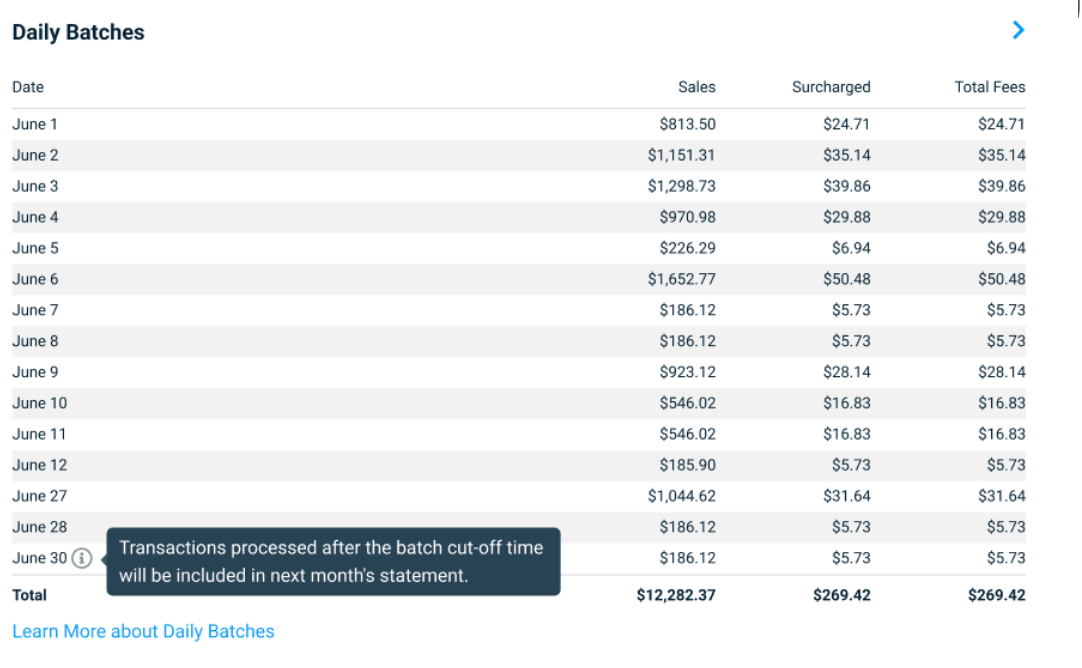
The blue arrow in the top right will direct you to the reconciliation report, where you can view batch breakdowns. This report will show the transactions in each batch.
Volume Summary
The volume summary provides a summary of payment methods, types, and card brands.
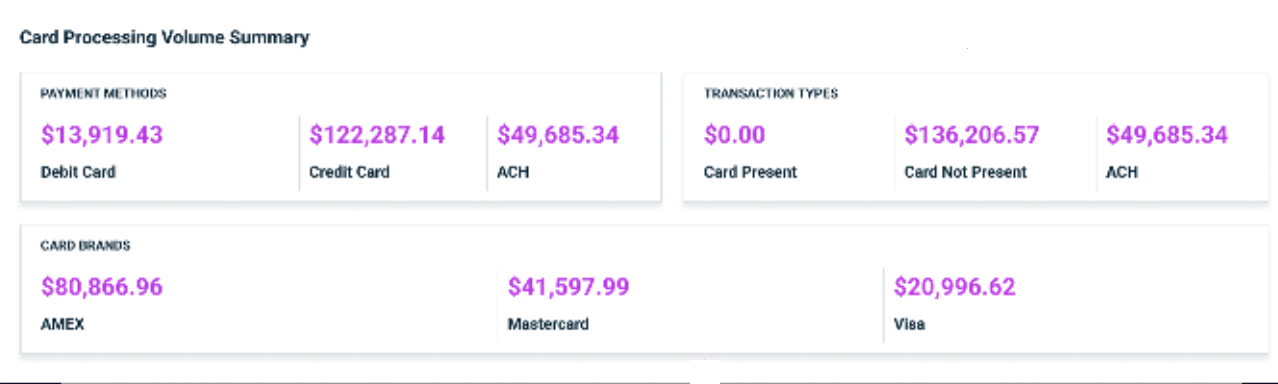
The payment method section shows Debit, Credit, and ACH/Other processing amounts. The ACH/Other category represents processing that cannot be determined as either a debit or credit card transaction.
Learning how much processing is done between debit and credit can be insightful.
The transactional section displays in-store (Card Present (CP)) or online sales (Card Not Present (CNP)) and Direct Bank transactions (ACH).
This can be insightful, as Card-Present transactions have cheaper processing fees. Additionally, if you process a high volume of Card-Not-Present (CNP) transactions, utilizing Level 2 Data or higher can help reduce processing fees.
The card volumes provide a more detailed view of each type of card and the associated charge and fees associated with each card type.
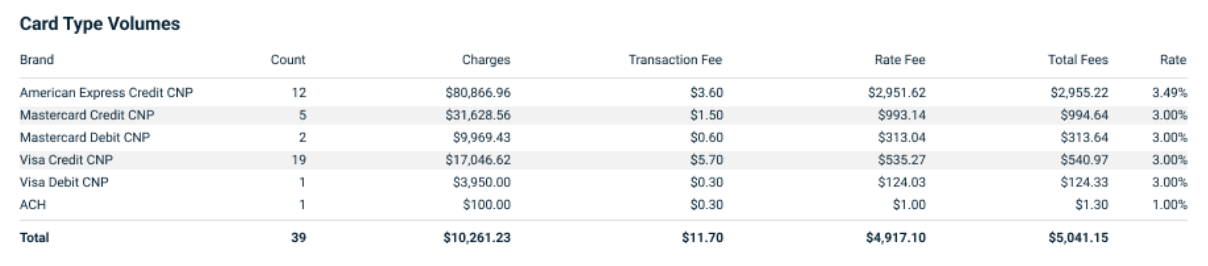
The transaction fee is charged every time a payment is processed. It is sometimes referred to as the per-swipe fee.
The rate fee is charged based on the rate configured for the merchant account. This can be a percentage or a flat rate.
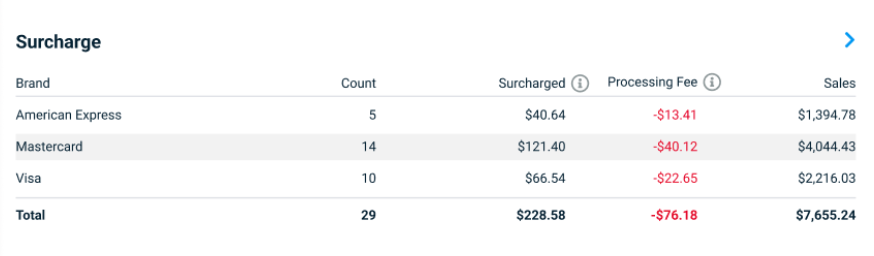
Surcharge (if applicable)
If surcharge is enabled, this section displays the surcharging amounts.
Refunds and Adjustments
This section displays any other activity, including refunds and disputes. Manual adjustments will appear, describing whether they were a debit or a credit and the category.
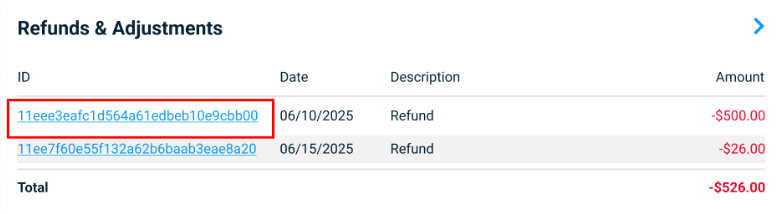
Adjustments will deposit or withdraw money from your bank account. An adjustment is associated with a category such as:
ACH - An adjustment for bank transactions that may have been rejected or required to be reprocessed/ retried.
Dispute - An adjustment associated with a dispute on a transaction.
Equipment - An adjustment for equipment, such as a terminal, that may have a monthly fee.
Fee - Adjustments associated with miscellaneous costs such as Account Updater, Minimum Monthly billing, Performance Analytics fees, or PCI Compliance fees.
Other - Manual adjustments made, which may include incidental charges or credits.
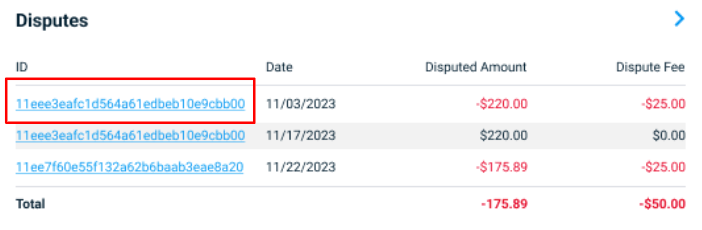
Dispute
The dispute section displays the disputed amounts and fees. Clicking the ID displays the disputed transaction.
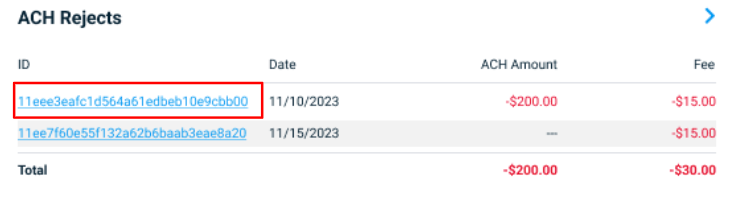
ACH Reject
An ACH return item fee is a charge assessed whenever an ACH transaction is returned or rejected by the end customer’s bank, equivalent to a returned check.
Updated about 1 month ago